
Start over with an empty diary
Clear Gun Diary for a fresh start: remove the Example Rifle, delete your records, empty Recently Deleted, and, if you want everything gone, delete Gun Diary's data from iCloud. Also: why deleting the app doesn't wipe your diary.
Sometimes you want a clean diary: you tried the app with test records, you muddled things while learning, or you’re handing the device on. Gun Diary has no single “erase everything” button, on purpose: your records are too valuable to lose with one tap. This article shows the steps that really clear it, and why deleting the app alone doesn’t.
Deleting the app is not a fresh start. With iCloud sync on, your diary lives in your own iCloud, so when you install Gun Diary again (on this or any device with the same Apple Account) the whole diary comes back. That’s what keeps it safe when a phone is lost.
Before you start
- Make a backup first, even if you’re sure: More > Backup and Export > Make a Backup > Full Backup, and save it to iCloud Drive or a computer. Once Recently Deleted is emptied, the backup is the only way back. See Back up and restore.
- Want just one device emptied (for example, a phone you’re giving away) but the diary kept on your others? Don’t delete records: sign out of your Apple Account on that device instead (or erase the device in its Settings app). Deleting records in Gun Diary deletes them on every synced device.
Steps
Clear your records (keeps the app ready to use)
-
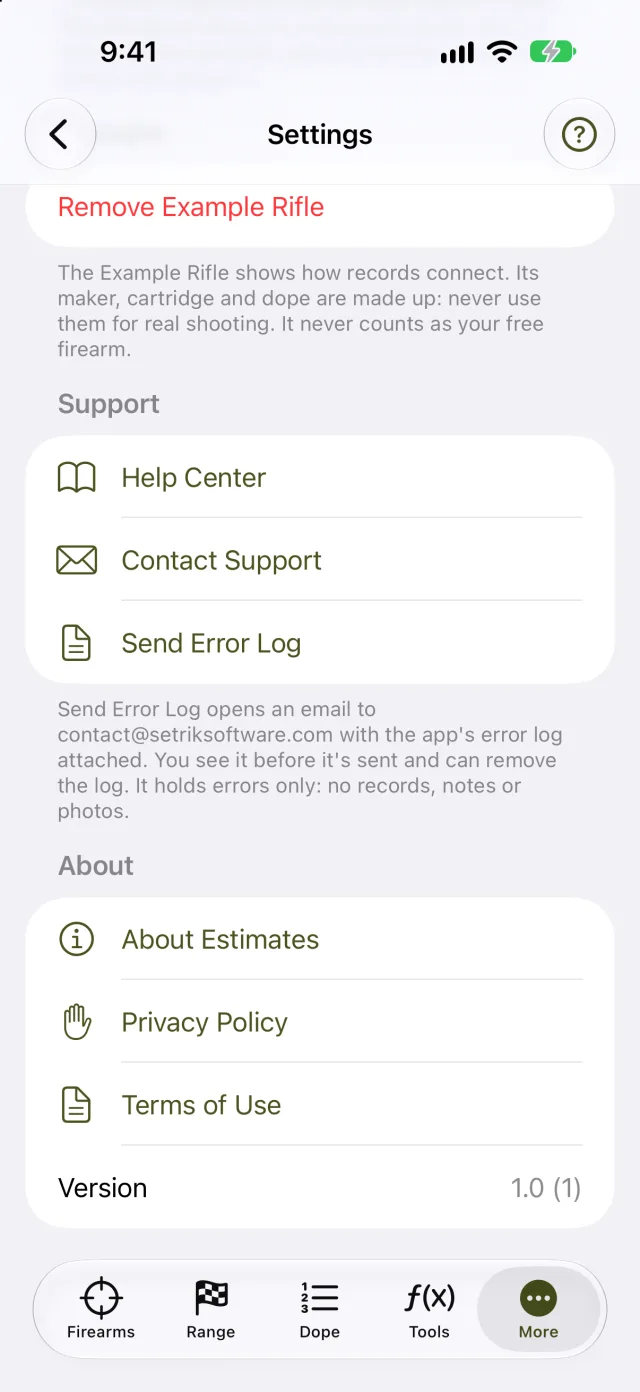
Remove the Example Rifle, if you like: More > Settings > Remove Example Rifle, then Remove Example Rifle in “Remove the Example Rifle?”. (You can bring it back with Restore Example Rifle.)
-
Delete each firearm: open it, tap ••• > Delete Firearm, tap Continue, type its name and tap Move to Recently Deleted. Its sessions, groups, dope tables, Garage records and documents go with it. See Edit, archive or delete a firearm.
- Delete the ammunition you don’t want: in More > Ammo Library, open each one, tap ••• > Delete. See An ammunition record.
- If you want them gone too, delete saved locations, Reference Library documents, tags and saved views from their own screens.
-
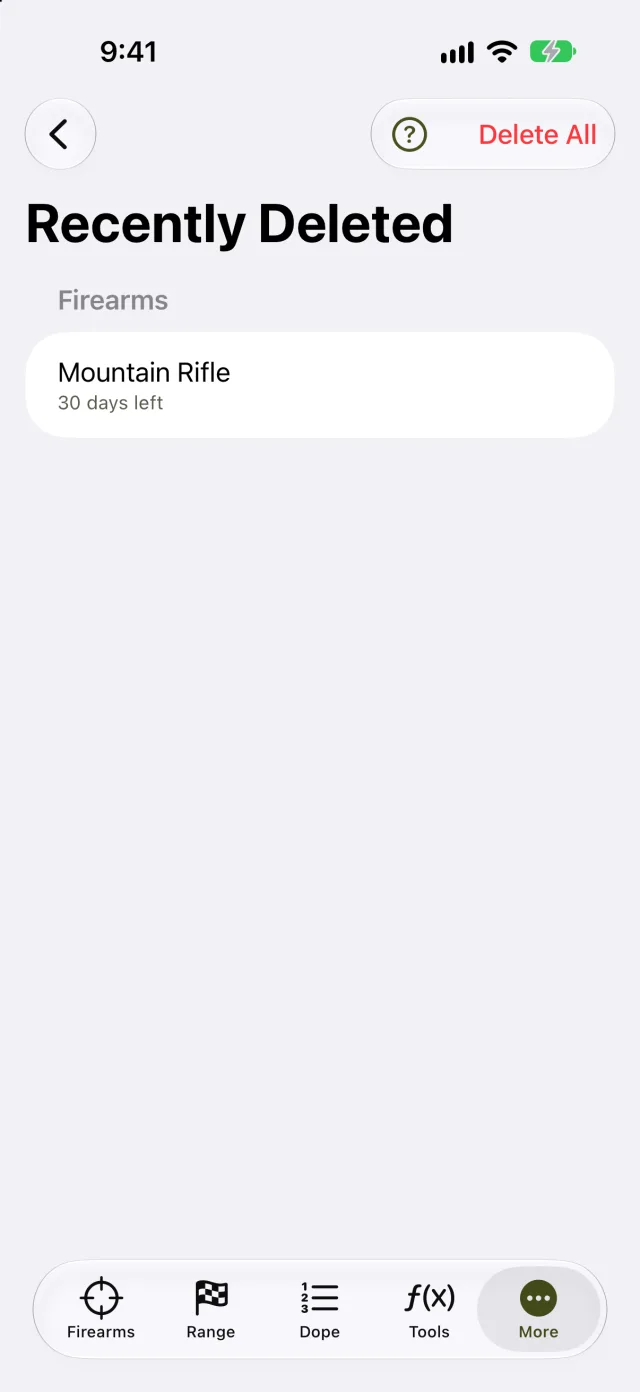
Tap More > Recently Deleted. Everything you deleted waits here for 30 days. Tap Delete All, then the red button that counts them, like “Delete 214 Records Permanently”. This can’t be undone.
-
Your diary is now empty on every device signed in to your Apple Account.
Remove Gun Diary’s data from iCloud too (everything, everywhere)
Do this only if you want no copy left in iCloud at all, for example before you stop using Gun Diary.
- Do the steps above first, or make sure you have the backup you want to keep.
- Delete Gun Diary from every iPhone and iPad.
- On one device, open the Settings app, tap your name at the top, then iCloud, then the option to manage your iCloud storage. Find Gun Diary in the list and choose to delete its data from iCloud. (The exact wording changes between iOS versions; it’s usually “Manage Account Storage” or “Manage Storage”, then “Delete Data from iCloud”.) This removes the diary from iCloud and from every device, and can’t be undone.
- Install Gun Diary again if you want to start fresh: it opens with the Welcome screen, the Example Rifle and an empty diary.
Why it’s useful
Gun Diary is built so records are hard to lose: deletes wait 30 days, sync puts the diary back on any new device, and nothing is erased with one tap. That’s right for years of range records, but it means a real fresh start takes a few deliberate steps. Knowing them keeps you from thinking you’ve wiped the diary when you haven’t, and from wiping more than you meant to.
Who uses it, and how:
- New users who tried things out: delete the test firearm and its records, empty Recently Deleted, and start for real.
- Anyone tidying a muddled diary: often deleting a few records is enough; start over only if it’s beyond repair.
- People leaving Gun Diary: make a full backup or Export All Data, then remove the data from iCloud.
- Someone giving a device away: sign out of the Apple Account on that device instead, so the diary stays on your other devices.
What each option means
Example
You spent your first evening adding a “Test gun” with made-up sessions and groups, plus two test ammunitions. Now you want to start properly.
- More > Backup and Export > Make a Backup > Full Backup, saved to iCloud Drive, just in case.
- Test gun > ••• > Delete Firearm > Continue, type “Test gun”, Move to Recently Deleted.
- In the Ammo Library, each test ammunition > ••• > Delete.
- More > Recently Deleted > Delete All > “Delete 31 Records Permanently”.
- The Firearms tab now shows only the Example Rifle. You add your real rifle.
Tips
- Start small. Deleting the wrong records is easier to undo than starting over: everything waits 30 days in Recently Deleted.
- Keep the backup you made before starting over for a while; it’s your only copy of the old diary.
- The free one-firearm limit counts firearms that aren’t deleted. Once a firearm is in Recently Deleted you can add a new one.
- Codes start where they left off. A new firearm after you start over gets the next code (like F004), not F001, because codes are never reused. That’s normal.
What it affects
- Deleting records and emptying Recently Deleted affects every device signed in to your Apple Account.
- Your Pro purchase isn’t affected: it belongs to your Apple Account. Tap Restore Purchases after reinstalling.
- Settings on each device (units, Personalize Your Diary) stay until you delete the app.
- Backups and exports you saved in Files or on a computer aren’t touched.
If something goes wrong
- I deleted the app and my diary came back. That’s iCloud sync. Follow the steps above to clear it.
- Records came back after I emptied Recently Deleted. Another device that was offline may still be catching up; open Gun Diary on it with a connection and wait a few minutes, then check Recently Deleted there too.
- I emptied Recently Deleted by mistake. Restore the backup you made first. See Back up and restore.
- I can’t find Gun Diary in iCloud storage. It appears only once it has stored something in iCloud. If it isn’t listed, sync wasn’t on for this Apple Account, so deleting the app removes the diary.
- The Example Rifle came back. A newly installed Gun Diary adds it on first launch. Remove it again in Settings.
Related
- Next: Recently Deleted: restore or delete for good.
- Back up and restore: make the safety copy first.
- Use Gun Diary on iPhone and iPad: how sync carries deletes to every device.
- Edit, archive or delete a firearm, Explore the Example Rifle, Settings.
- Learning path: Keeping your records safe.
- Words used here: recently deleted, iCloud sync, backup, code.
Still stuck? In the app, open More > Help > Contact Support, or More > Settings > Support, which also has Send Error Log (the error log helps us find the problem), or email contact@setriksoftware.com. You can also browse the Help Center or the messages the app can show.