
"Calculator #27: Shotgun Pattern %"
Work out a shotgun's pattern percentage, the share of a shell's pellets inside the 30 in circle, for each shot and on average.
Shotgun Pattern % (calculator #27) works out pattern percentage: how many of a shell’s pellets landed inside the circle, as a percentage of all the pellets in the shell. Type the pellets per shell and the counts from each shot; it shows each shot’s percentage and the average. It’s plain arithmetic, no estimates.
Steps
- Tap the Tools tab. Under Shotgun, tap Shotgun Pattern %.
- Type the Pellets per shell (count a few shells or use the shot charge’s pellet count).
- In the counts field (it shows “Pellets in the circle, like 262; 281” when empty), type the number of pellet holes inside the circle for each shot, separated by semicolons.
-
Read Result: a line per shot (Shot 1, Shot 2…) with its percentage, and the Average.
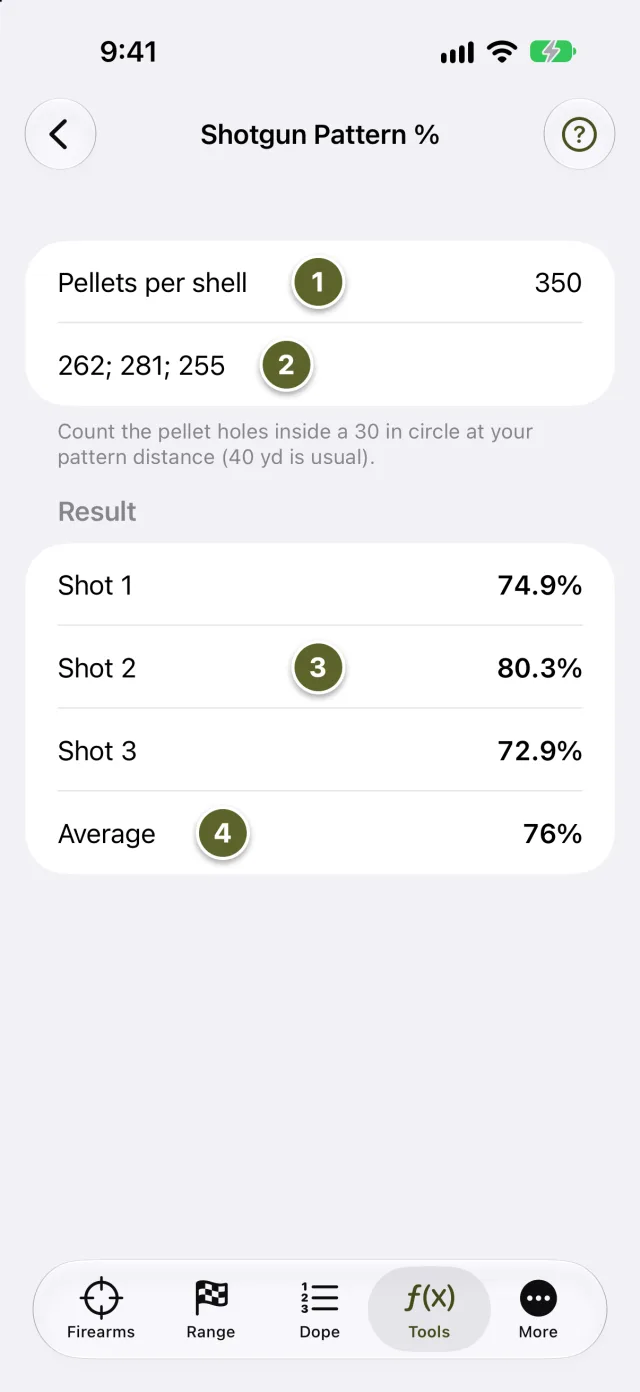
Numbers on the picture: 1 Pellets per shell, 2 the counts, 3 each shot’s percentage, 4 Average.
Nothing is saved here. To keep a pattern with its photos, choke and distance, use Pattern a shotgun.
Why it’s useful
A shotgun’s pattern decides whether a bird or a turkey’s head gets enough pellets. Pattern percentage is the standard way to compare chokes, shells and shot sizes from the same gun: shoot at a big sheet at a set distance, draw the 30 in circle around the densest part, count the holes, and divide by the pellets in the shell. The counting is the hard part; this does the rest.
Who uses it, and how:
- Turkey hunters: compare chokes and loads for the tightest pattern at your longest planned distance.
- Waterfowl hunters: check that a steel or other non-lead load and choke give an even, dense pattern at decoy range.
- Upland hunters: confirm an open choke spreads enough at close range.
- Clay and sporting shooters: see what each choke really does in your barrel.
- New shotgun owners: learn what the choke markings mean in practice by measuring them.
What each option means
The footnote gives the usual method: count the pellet holes inside a 30 in circle at your pattern distance (40 yd is usual). Turkey hunters often use a smaller circle (10 in on the head and neck) at their own distance; the math is the same, but compare only patterns counted the same way.
Example
- The screen opens with the app’s tested example: Pellets per shell 350, counts 262; 281; 255. Shot 1 74.9%, Shot 2 80.3%, Shot 3 72.9%, Average 76%.
- A 12-gauge with a modified choke and a field load of about 410 pellets, three shots at 40 yd counting 238; 271; 259: 58%, 66.1%, 63.2%, Average 62.4%.
- Swap to an improved-modified choke, shoot three more and type the new counts. The averages side by side tell you which choke patterns tighter with this load.
Tips
- Shoot at least three shells per choke and load. Patterns vary from shot to shot; the average is what counts.
- Count the pellets per shell by cutting open one or two shells if the box doesn’t say; it varies with shot size.
- Draw the circle around the densest part of the pattern, not around your aiming point, unless you’re checking point of impact.
- Keep the distance the same when comparing.
- Save the session. Pattern a shotgun keeps the photos, choke, shell, distance and counts, and the pattern report prints them.
What it affects
Nothing. This calculator saves nothing. Patterns you record with Pattern a shotgun work out the same percentages and keep them.
If something goes wrong
- Results show a dash. Type Pellets per shell (above zero) and at least one count.
- A shot is missing. Separate counts with semicolons, commas or spaces.
- A count with a decimal is cut to a whole number (262.7 counts as 262). Pellet counts are whole numbers.
- Over 100%. The count is higher than the pellets per shell; check both numbers.
Related
- Next: back to The Tools tab.
- Pattern a shotgun, Patterns, Pattern report.
- The Tools tab.
- Learning path: Shotgun patterning.
- Words used here: pattern percentage, choke, pellet count.
Guides on this topic
- What Distance Should Be Used to Pattern a Shotgun, and Which Circle?
- What Tightens a Shotgun Shot Pattern? Choke, Shells, Distance and Your Own Tests
Still stuck? In the app, open More > Help > Contact Support, or More > Settings > Support, which also has Send Error Log (the error log helps us find the problem), or email contact@setriksoftware.com. You can also browse the Help Center or the messages the app can show.