
Add an ammunition
Add a factory ammunition or shotshell to your Ammo Library (maker, product line, cartridge or gauge, bullet or shot), or edit one you already have.
Add each kind of factory ammunition you shoot to the Ammo Library once: who makes it, its product line, the cartridge or gauge, and the bullet or shot. The same form edits an ammunition later. You only need a maker or a product line to save; everything else is optional.
Steps
-
Open the form one of these ways:
- More > Ammo Library > + (Add Ammunition). The form is titled Add Ammunition.
- From inside a session, group, favorite or dope table: tap the ammunition row, then Add Custom Product at the top of the list. The form is titled Add Custom Product. See Pick an ammunition.
- To change one you have: open it, tap ••• > Edit. The form is titled Edit Ammunition.
-
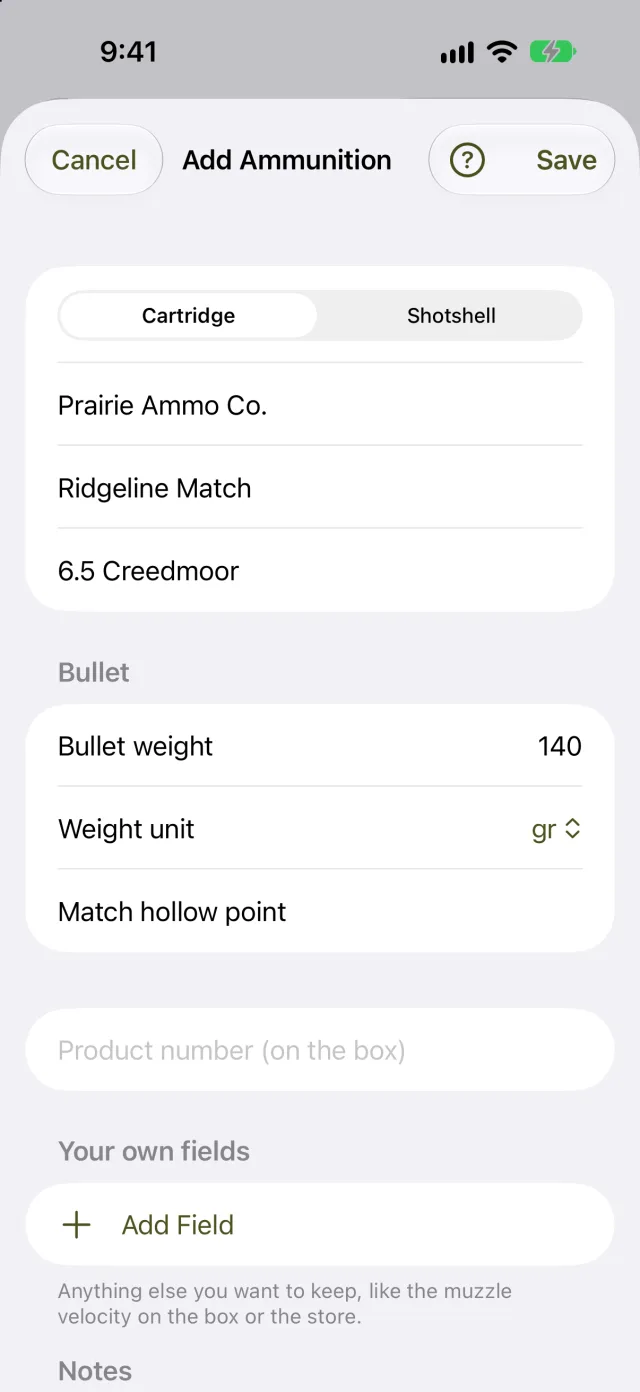
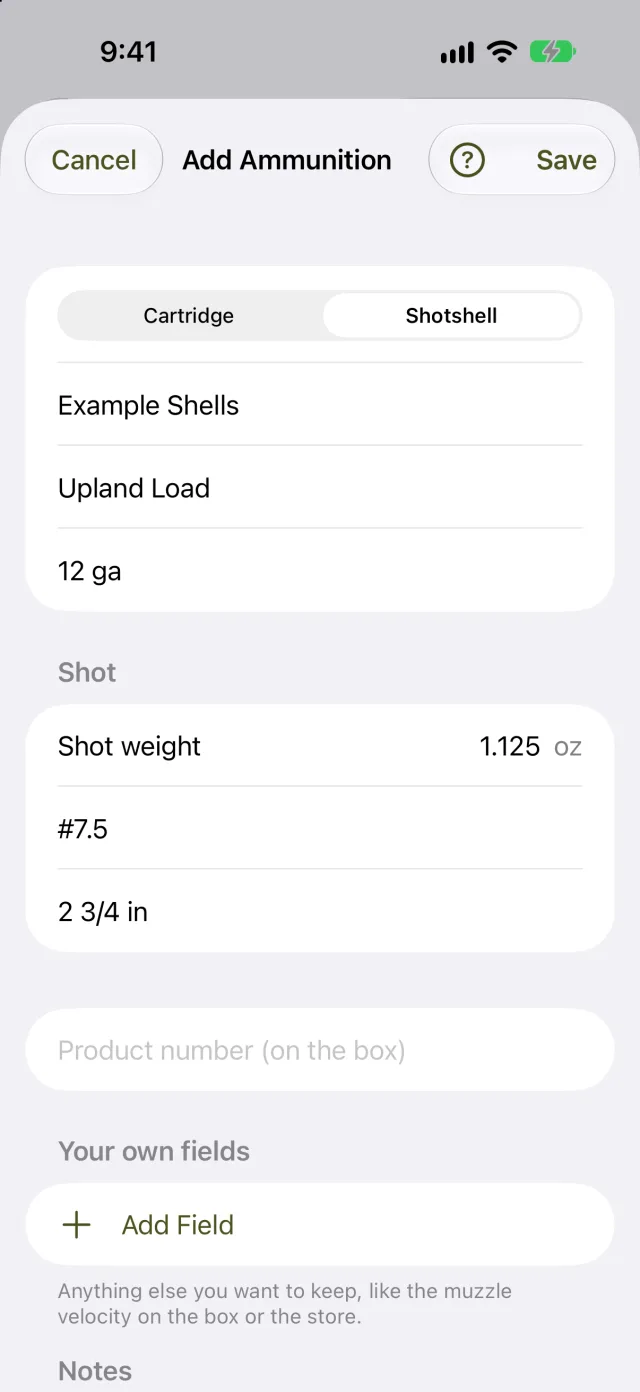
At the top, pick the kind with the switch: Cartridge (rifle and handgun ammunition) or Shotshell (shotgun shells). The fields below change to match.
- Type the maker (the company on the box) and the product line (the name on the box). The gray hint text in each box shows what goes there.
- Type the cartridge (like 6.5 Creedmoor) or, for a shotshell, the gauge (like 12 ga).
-
For a cartridge, under Bullet: type the Bullet weight, choose the Weight unit (gr or g) and type the bullet type (like FMJ or soft point). For a shotshell, under Shot: type the Shot weight in ounces, the shot size (like #7.5 or BB) and the shell length (like 2 3/4 in).
-
Type the product number from the box (Product number (on the box)), if you want it.
- Under Your own fields, tap Add Field for anything else you want to keep, such as the muzzle velocity printed on the box or the store. Type a Field name and a Value. Swipe a field left to remove it.
- Add Notes if you like.
- When editing an ammunition you already saved, a Photos section appears: tap Take Photo or Add from Photos to add a picture of the box.
- Tap Save (or Save to My Ammunition when you came from inside an entry). The new ammunition gets the next code (FA-002, FA-003…) and appears in the library under its cartridge.
Why it’s useful
Writing the ammunition down properly once pays off every time you shoot. Your groups, Zero Checks and dope tables are only as useful as the note of what you were shooting: the same rifle can hit a different spot with a different bullet weight, maker or lot.
Who uses it, and how:
- New gun owners add the box they bought with the gun. Maker and product line are enough to start; the rest can wait.
- Hunters add their hunting ammunition with the bullet type (bonded, soft point, monolithic), so the hunt log and dope always show exactly what was in the rifle.
- Long-range shooters add the bullet weight and the box’s product number, and keep the box velocity in Your own fields to compare with what their own chronograph measures.
- Shotgunners add shotshells with gauge, shot size, shot weight and shell length, which is what patterns and choke tests depend on.
- Handgun shooters add practice FMJ and carry ammunition separately, so round counts and malfunctions can be traced to the right one.
- Anyone in a hurry at the range adds a missing box from inside the session with Add Custom Product; nothing typed in the session is lost.
What each option means
The lot number isn’t on this form: lots are added on the ammunition’s record, because one ammunition can have many lots. See Lots.
Example
You bought a case of match ammunition for the Mountain Rifle:
- More > Ammo Library > +.
- Kind: Cartridge. Maker: Prairie Ammo Co. Product line: Ridgeline Match. Cartridge: 6.5 Creedmoor.
- Bullet weight: 140, Weight unit: gr, bullet type: Match hollow point.
- Product number: RM65140.
- Add Field: field name “Box velocity”, value “2710 fps“. Add Field: “Store”, “Valley Outdoors”.
- Save. “Prairie Ammo Co. Ridgeline Match 140 gr” (FA-002) appears under 6.5 Creedmoor; the bullet weight is added to the name on its own. You open it and tap Add Lot to record the lot number printed on the case.
A shotshell for the duck blind: kind Shotshell, maker “Prairie Ammo Co.”, product line “Steel Waterfowl”, gauge 12 ga, Shot weight 1.125, shot size #2, shell length 3 in. It shows in the library as “Prairie Ammo Co. Steel Waterfowl 1.125 oz”, with “FA-005 · 12 ga · 1.125 oz · #2 · 3 in” under it (FA-005 is its code; yours may differ).
Tips
- Copy the box exactly. Maker, product line and product number as printed make the record easy to match to a new box later.
- Different bullet weight, different ammunition. A 140 gr and a 130 gr box of the same line are two records. For a near-twin, open the first one and use ••• > Duplicate; see An ammunition record.
- Same ammunition, new box: don’t add it again. Add a lot to the existing record.
- Keep the box velocity in Your own fields. It’s the maker’s number from their test barrel; your rifle’s own speed comes from your chronograph strings on groups.
- Fill in later. Maker or product line is enough to save; come back to Edit when you have the box in hand.
What it affects
- Every record that uses this ammunition shows the new details right away when you edit it: sessions, groups, favorites, dope tables, reports.
- The Ammo Library heading changes if you change the cartridge or gauge.
- Pickers: a new ammunition can be picked at once in sessions, groups, favorites, Zero Checks, hunts, patterns and dope tables.
- Search, exports and backups include every field, your own fields and notes.
If something goes wrong
- “Type the maker or the product line”. Tapping Save shows this when both are blank. Type a maker or a product line; one of them is required.
- I picked the wrong kind. Tap the other side of the Cartridge / Shotshell switch; the fields change. A shotshell’s shot weight and a cartridge’s bullet weight are kept in the same place, so check the weight after switching.
- There’s no Photos section. It appears when you edit an ammunition that’s already saved. Save first, then ••• > Edit.
- My new ammunition is under the wrong heading. The cartridge was typed differently from the others (for example “6.5 CM” and “6.5 Creedmoor”). Edit it to match.
- I added the same ammunition twice. Combine them with Merge duplicate ammunition.
- I came from a session and lost my place. You didn’t: Save to My Ammunition saves the new ammunition, picks it and returns you to the session with everything you typed.
Related
- Next: An ammunition record, then Lots.
- The Ammo Library, Pick an ammunition, Merge duplicate ammunition.
- Learning paths: New gun owner, Testing factory ammo.
- Words used here: factory ammunition, grain, gauge, shotshell, lot, code.
Still stuck? In the app, open More > Help > Contact Support, or More > Settings > Support, which also has Send Error Log (the error log helps us find the problem), or email contact@setriksoftware.com. You can also browse the Help Center or the messages the app can show.