
Barrel history
Record a firearm's barrels (maker, length, twist, material, install and removal dates, rounds before this diary) so each barrel keeps its own round count and a rebarrel never needs a new firearm.
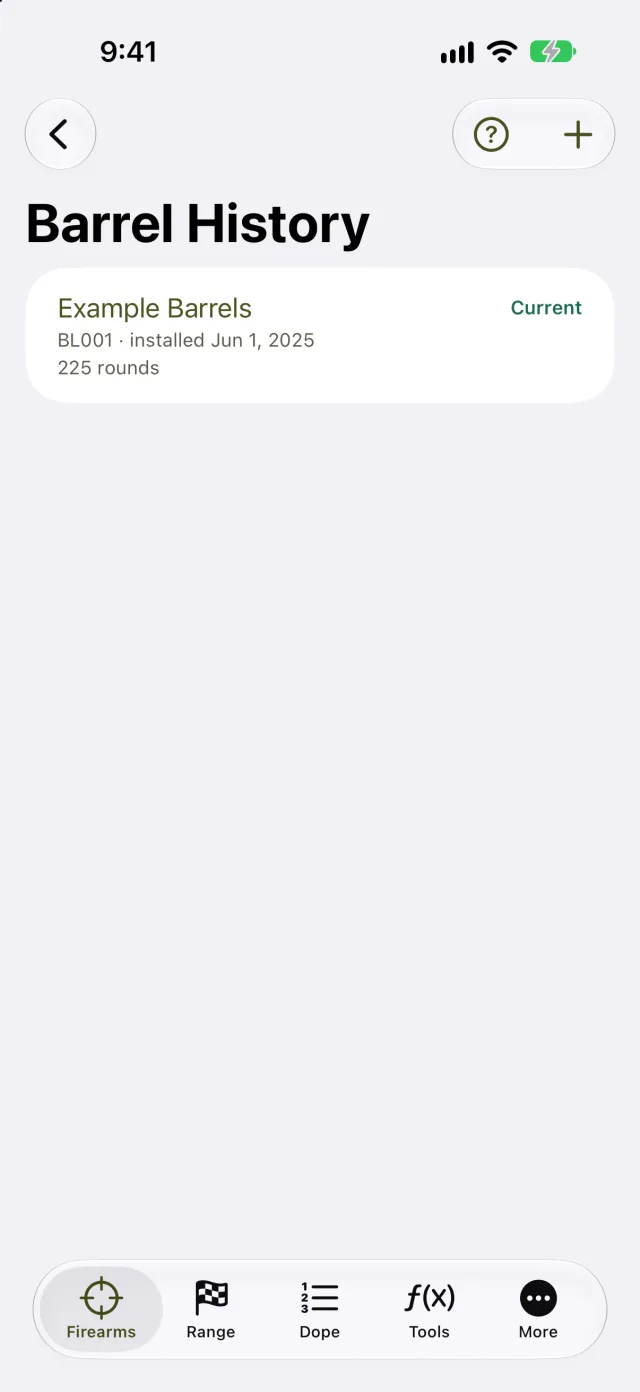
Barrel History keeps a firearm’s barrels: the one on it now and any it had before, each with its maker, length, twist rate, material, install and removal dates and its own round total. Rounds fired in a session count toward the barrel fitted on the session’s date, so when you rebarrel, the Current barrel counter starts again while Lifetime rounds keeps counting. A new barrel never needs a new firearm.
Steps
Add the barrel that’s on the gun
- Open the firearm > The Garage > Barrel History.
- Tap Add Barrel (+ at the top right).
-
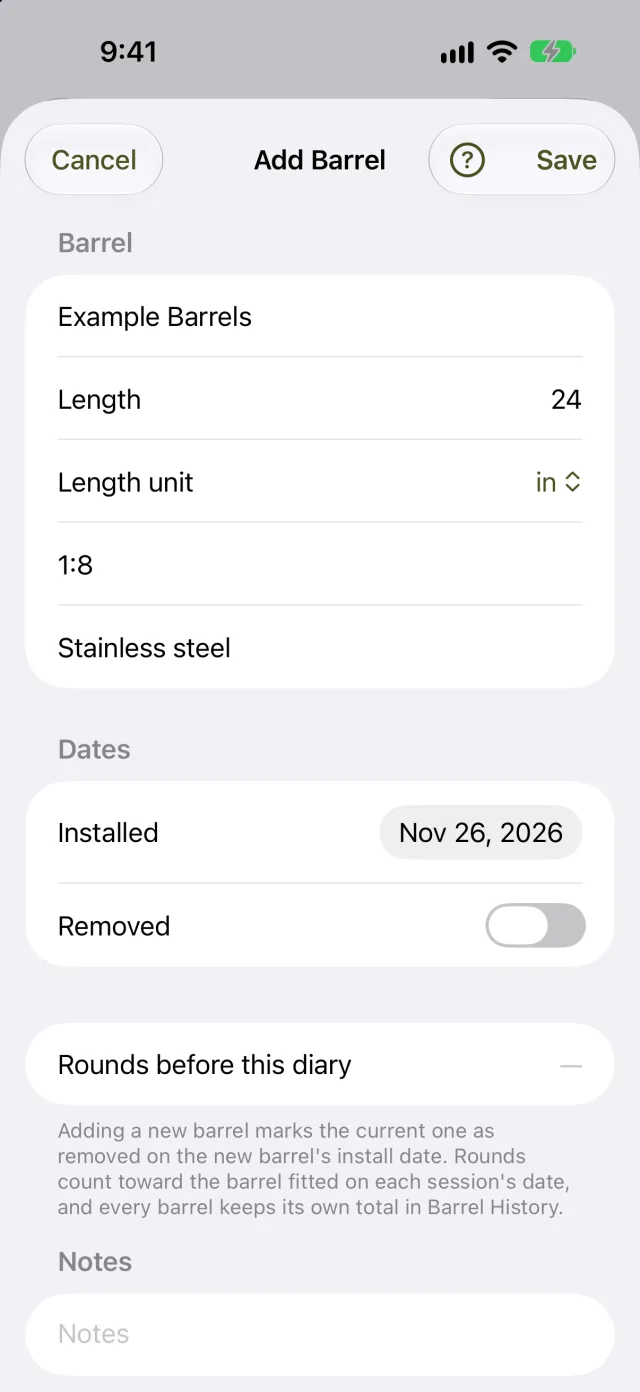
Under Barrel, type the Maker, the Length and its Length unit (in or mm), the Twist rate (like 1:8) and the Material.
-
Under Dates, check Installed. For the first barrel it starts at the day you added the firearm, so earlier sessions count toward it; change it if the barrel went on later.
- Type Rounds before this diary if the barrel was shot before you started recording. For the barrel the gun came with, this is usually the same number you typed as Rounds already fired for the firearm; leave it blank and Current barrel starts from zero (from the sessions on this barrel only), not from the firearm’s starting count.
- Add Notes (chamber reamer, who fitted it, headspace) and tap Save.
Record a new barrel (rebarrel)
- In Barrel History, tap Add Barrel.
- Fill in the new barrel and set Installed to the day it went on.
-
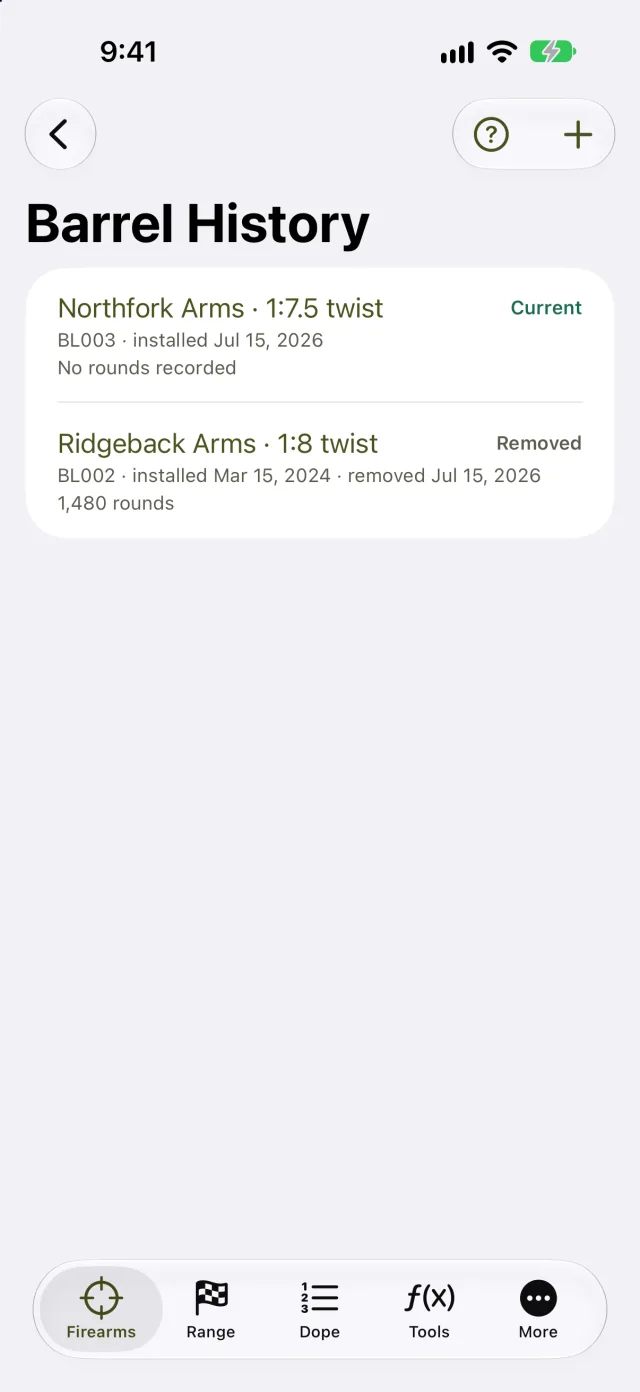
Tap Save. The old barrel is marked Removed on the new barrel’s install date, and the new one is Current.
Edit, swap back or delete a barrel
- Tap a barrel to open Edit Barrel and change any field. Save re-files every session’s rounds on the barrel fitted on its date.
- To mark a barrel taken off without fitting another, turn on Removed and set Removed on. To put a removed barrel back on, turn Removed off (and set Removed on for the barrel you took off).
- To delete a barrel recorded by mistake, tap Delete Barrel, then Move to Recently Deleted. Its rounds go back to unassigned: they still count toward the lifetime total. You can restore it from More > Recently Deleted for 30 days.
Why it’s useful
Barrels wear out; a match rifle’s throat may be done long before the action is. Shooters track rounds on the barrel to know when accuracy may fall off, when to set back or replace it, and how the rifle shot on each barrel. Without barrel records, the round count is only the action’s count, and a rebarreled rifle’s history gets lost or has to be a “new” firearm.
Who uses it, and how:
- Long-range and precision shooters watch rounds on the barrel against its expected life and compare group sizes from new to worn.
- Competitors rebarrel between seasons and keep the old barrel’s total for reference.
- Hunters record a rebarrel to a new cartridge or a lighter contour, and note the twist rate for bullet choice.
- People with prefit barrels record each barrel as it goes on. (A barrel has one installed and one removed date, so a barrel swapped on and off many times is best kept with adjustments; see Round counts.)
- Buyers and sellers of used rifles record the barrel’s known rounds so the next owner has a history.
- AR shooters who swap uppers or barrels record each one.
Gun Diary counts what you record; it doesn’t predict barrel life or tell you when a barrel is worn out.
What each option means
In the list: each barrel shows its maker and twist (“Ridgeback Arms · 1:8 twist”), Current (green) or Removed, its code (BL001…), installed and removed dates, and its rounds (“1,480 rounds” or “No rounds recorded”). Newest install first. With none: “No barrels recorded” and “Add the firearm’s barrel to track its own round count. Replacing a barrel never needs a new firearm.”
The footer under Rounds before this diary says: “Adding a new barrel marks the current one as removed on the new barrel’s install date. Rounds count toward the barrel fitted on each session’s date, and every barrel keeps its own total in Barrel History.”
Example
The Mountain Rifle had 600 rounds when you started the diary on January 10, 2026, all on its factory barrel.
- Barrel History > Add Barrel. Maker: Ridgeback Arms (factory). Length: 22, in. Twist rate (like 1:8): 1:8. Installed: January 10, 2026 (already filled in). Rounds before this diary: 600. Save. It’s BL002.
- By July you’ve recorded 880 more rounds in sessions. The barrel reads “1,480 rounds”; Lifetime rounds 1,480, Current barrel 1,480.
- On July 15 a gunsmith fits a new 24-inch barrel. Add Barrel: Maker: Northfork Arms, Length: 24, Twist rate (like 1:8): 1:7.5, Installed: July 15, 2026, Rounds before this diary blank. Save.
- BL002 now shows Removed on Jul 15, 2026 with 1,480 rounds; the new BL003 is Current with “No rounds recorded”. Current barrel reads “—” and Lifetime rounds still 1,480.
- After a 40-round session on July 20: BL003 shows 40 rounds, Current barrel 40, Lifetime rounds 1,520.
Tips
- Add the barrel that’s on the gun first, even if it’s the factory one, so its count is kept when you rebarrel. Copy the firearm’s Rounds already fired into its Rounds before this diary, or Current barrel drops to the session rounds only.
- Set the install date right. A session counts toward the barrel fitted on its date; a barrel dated too late leaves earlier sessions unassigned (lifetime only).
- Record the gunsmith’s work too: a Professional service entry in the Maintenance log with the invoice.
- A new barrel changes your dope. Dope tables proven on the old barrel show “earlier setup“. Prove the new barrel’s come-ups. See Earlier setup.
What it affects
- Round counters: Current barrel counts the current barrel’s Rounds before this diary plus rounds and adjustments recorded on it. With no barrel recorded, it equals Lifetime rounds. See Round counts.
- Sessions and adjustments: re-filed on the barrel fitted on their date whenever a barrel is added, edited or deleted.
- Dope tables: a table proven with a barrel that’s no longer current is marked “earlier setup”. See Earlier setup.
- Reports and export: in the round count report, the firearm history PDF (Pro), backups and Export All Data.
If something goes wrong
- Current barrel shows “—” after a rebarrel. Nothing has been fired on the new barrel yet. It counts from the next session.
- A session counted toward the wrong barrel. Check the barrels’ Installed and Removed on dates; a session counts toward the barrel fitted on its date. Fix the date and Save.
- Two barrels say Current. One of them has no removed date. Open the older one and turn on Removed.
- I added my first barrel and Current barrel dropped (from 600 to “—”, say). With no barrel recorded, Current barrel equals Lifetime rounds, starting count included. Once a barrel is recorded it counts that barrel’s Rounds before this diary plus the sessions on it. Edit the barrel and type the firearm’s Rounds already fired there. Nothing was lost; Lifetime rounds is unchanged.
- Current barrel is lower than I expected. Sessions before the current barrel’s install date count to lifetime only. Type the barrel’s earlier rounds in Rounds before this diary, or move Installed earlier.
- I deleted a barrel by mistake. More > Recently Deleted, swipe right on it, tap Restore within 30 days.
Related
- Round counts, The Garage, Maintenance log, Earlier setup, Specs, equipment and configurations.
- See also the learning path Keeping your collection’s records.
- Words used here: barrel life, twist rate, round count, earlier setup.
Gun Diary keeps records you enter and does arithmetic on them. It never predicts a trajectory; confirm every hold by shooting it at the range, and always know your target and what is beyond it.
Still stuck? In the app, open More > Help > Contact Support, or More > Settings > Support, which also has Send Error Log (the error log helps us find the problem), or email contact@setriksoftware.com. You can also browse the Help Center or the messages the app can show.