
Specs, equipment and configurations
Record what's on a firearm (scope, mount, trigger, muzzle device, stock, choke, light and anything else) in dated configurations, so every group and dope table keeps the setup it was shot with; rename, redate or delete a configuration.
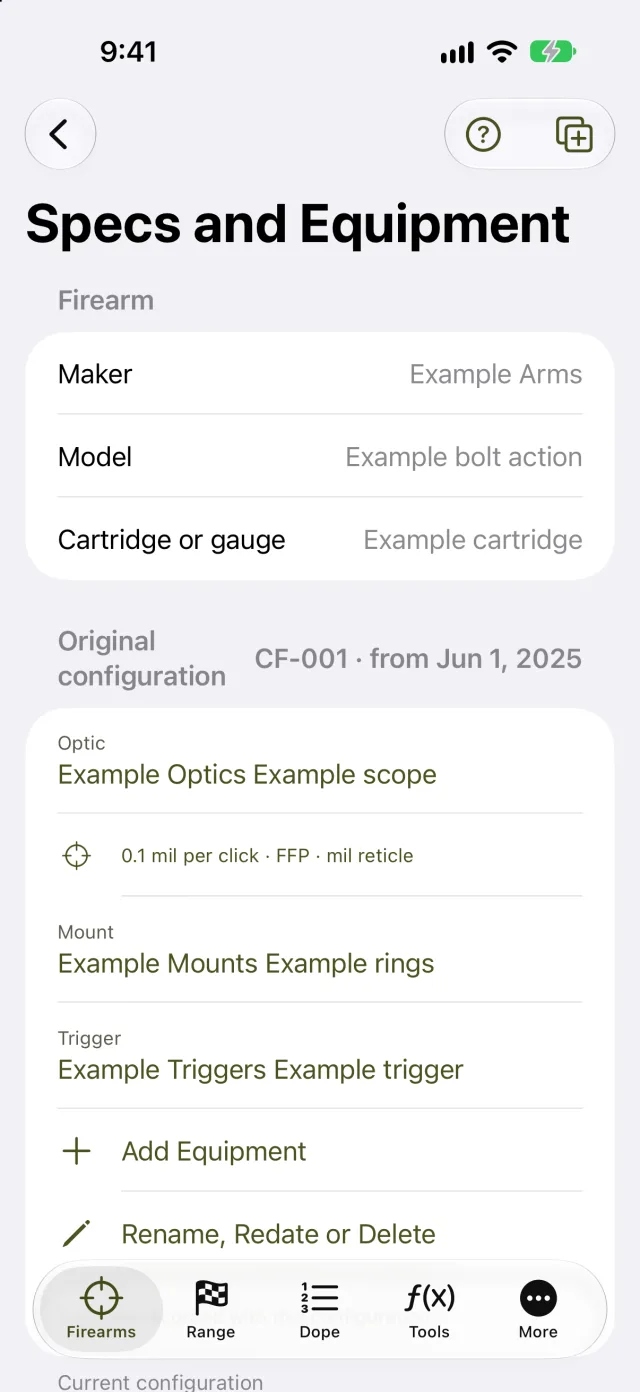
Specs and Equipment lists what’s on a firearm: its maker, model and cartridge at the top, then its equipment (scope, mount, trigger, muzzle device, stock and anything else) grouped into dated configurations. A configuration is one version of the gun’s setup, starting on a date. Every gun starts with an Original configuration; when you change something you make a new one, so groups and dope recorded before the change keep the setup they were shot with.
Steps
Open the list
- Open the firearm, tap The Garage, then Specs and Equipment.
- At the top, Firearm shows the Maker, Model and Cartridge or gauge from the firearm’s profile (change them with Edit Firearm).
- Below, each configuration is a section, newest first. Its header shows its name, its code and the date it starts (“CF-001 · from Jan 10, 2026”); the one in effect today says Current configuration under it.
Add equipment
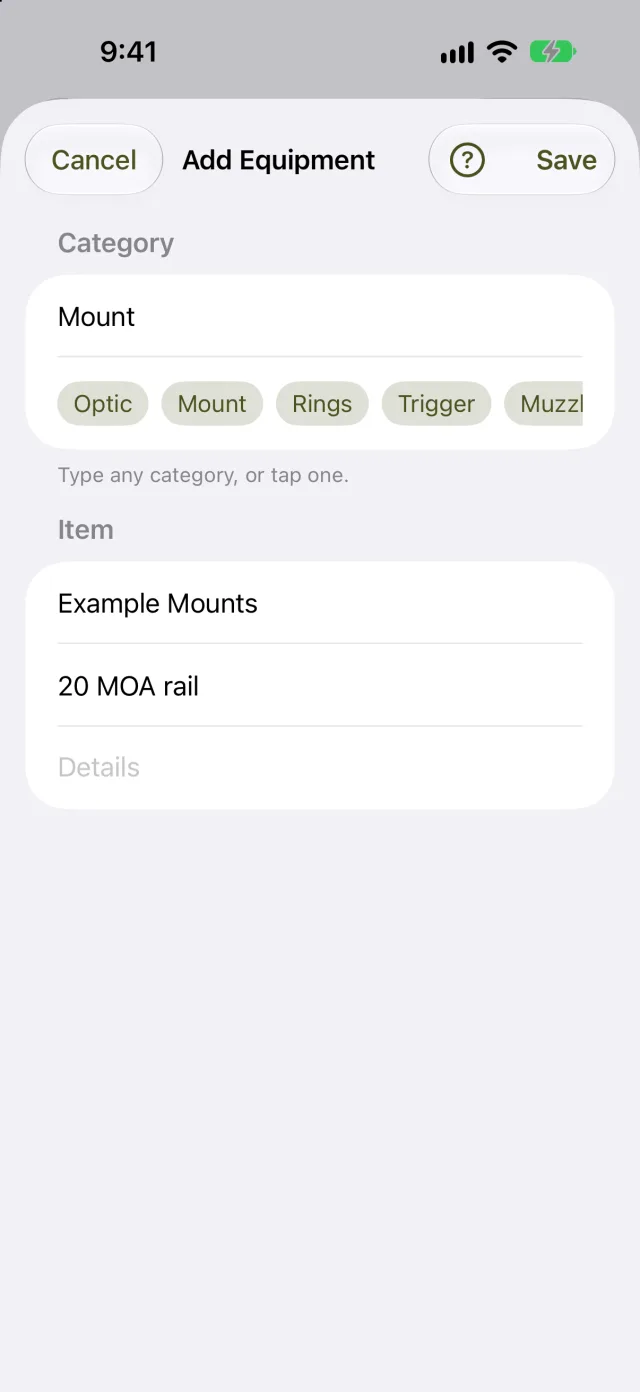
- In the configuration you want (usually the current one), tap Add Equipment.
-
Type a Category, or tap one of the suggestions: Optic, Mount, Rings, Trigger, Muzzle device, Suppressor, Stock or chassis, Choke, Light, Sling, Bipod, Other.
-
Under Item, type the Maker, Model and Details (magnification, torque, settings, anything).
- Tap Save. The item shows in the configuration with its category above its maker and model.
- For a scope or sight, a line with its optic settings appears under it (“Not set: add the click value” until you fill them in; until then, groups and Zero Check show no clicks). Tap it to open Optic Settings. See Optic settings.
Edit or remove equipment
- Tap the item to open Edit Equipment. Change any field and tap Save.
- To take it off, tap Remove from This Configuration, then Remove Equipment. This can’t be undone: the item doesn’t go to Recently Deleted. It comes off this configuration only, with its optic settings; other configurations keep their own copy.
Fixing a typo or adding a detail? Edit. Changed the gun (a new scope, a new trigger)? Don’t edit the old configuration: make a new one, so older records keep the setup they had. See Record an equipment change.
Rename, redate or delete a configuration
-
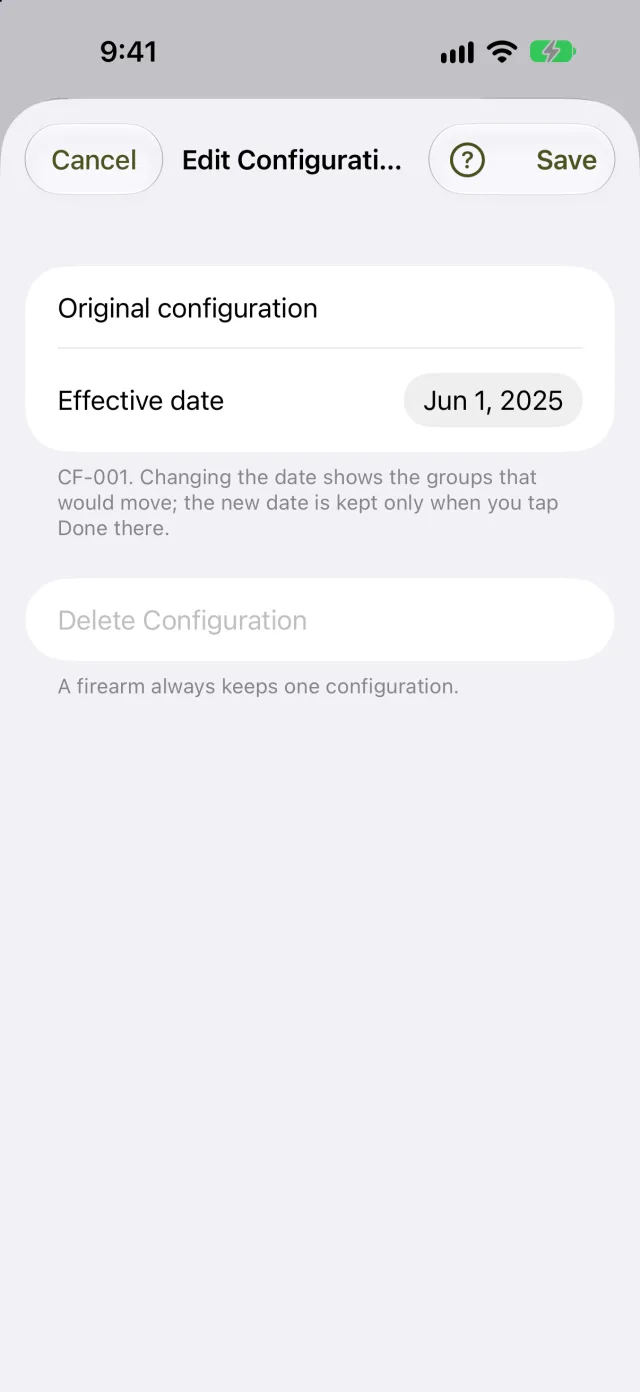
In the configuration, tap Rename, Redate or Delete.
-
To rename it, change the name (like “New scope”) and tap Save.
-
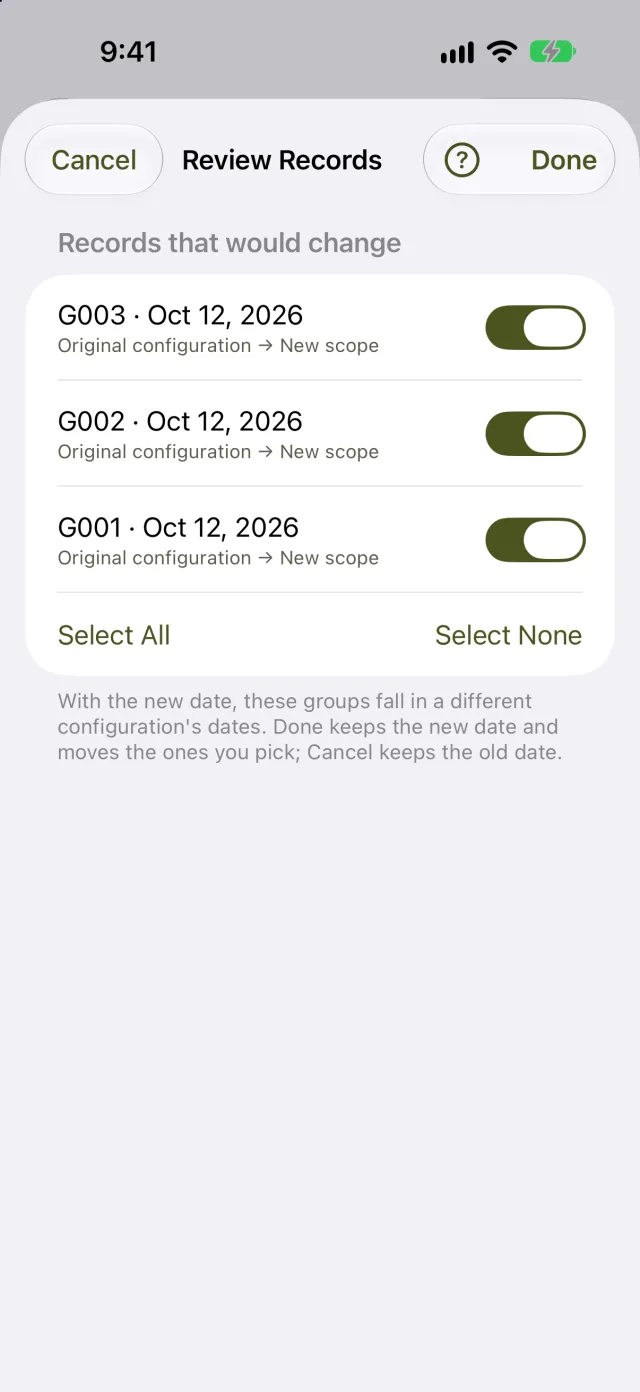
To change when it starts, change the Effective date and tap Save. A configuration starts at the beginning of its effective day. If groups would fall in a different configuration’s dates, Review Records opens before anything changes: each group with its date and “old → new” configuration, all selected. Turn off any you want to keep where they are (or use Select All / Select None), then tap Done: the new date is kept and the picked groups move. Cancel keeps the old date and moves nothing. With no groups to move, Save keeps the new date at once.
-
To delete it, tap Delete Configuration, then Delete Configuration again in the message. Its groups move to the previous configuration, and its equipment list goes with it to Recently Deleted. Restoring it from Recently Deleted brings the configuration back but not its groups (see “If something goes wrong”). A firearm always keeps at least one configuration, so the button is grey when there’s only one.
Why it’s useful
A group shot with a 3-9x scope and a factory trigger says something different from the same group shot after a 5-25x scope and a new trigger went on. Without dates, the equipment list only says what’s on the gun today, and every old record silently looks like it was shot with today’s setup. Configurations keep each record honest.
Who uses it, and how:
- Precision and long-range shooters keep the scope, rings, mount and their settings with each setup; a dope table proven with one scope is marked “earlier setup” when the scope changes, so an old card isn’t trusted by mistake.
- Hunters note the scope and sling, and see whether a change happened since the last zero check.
- Competitors record the parts that change between seasons or divisions.
- Shotgunners record the choke installed (and the pattern records say which choke they used).
- Builders and tinkerers keep a parts list for each version of a build, with makers and models for re-ordering.
- Collectors and insurers get a list of accessories and optics, which can be worth as much as the gun.
What each option means
Add Equipment and Edit Equipment: | Field | What to enter | |—|—| | Category | Any category (up to 60 characters), or a suggestion. Categories with “optic”, “scope”, “sight” or “red dot” in them get optic settings | | Maker, Model | Who made it and its model | | Details | Anything else, up to 500 characters | | Optic settings | Shown when editing a scope or sight: click value, reticle, focal plane and elevation left | | Remove from This Configuration | Takes the item off this configuration only. It can’t be undone and doesn’t go to Recently Deleted |
Edit Configuration: | Field | What it does | |—|—| | Name (like “New scope”) | The configuration’s name; blank becomes “Configuration” | | Effective date | The day it starts, from the beginning of that day. Records dated on or after it (until the next configuration) belong to it | | Delete Configuration | Moves it to Recently Deleted; its groups go to the previous configuration. Grey when it’s the only one (“A firearm always keeps one configuration.”) | | Review Records | Shown after a date change that would move groups: pick which groups move. Done keeps the new date; Cancel keeps the old one |
Example
Your Mountain Rifle’s Original configuration (CF-002, from Jan 10, 2026) is empty. You add what’s on it:
- Add Equipment > Optic. Maker: Summit Optics. Model: 4-16×44 FFP. Save.
- Add Equipment > Rings. Maker: Summit Optics. Details: 30 mm, medium, 20 in-lb. Save.
- Add Equipment > Muzzle device. Maker: Northfork Arms. Model: Muzzle brake. Save.
The configuration now lists Optic, Rings and Muzzle device; under the optic, “Not set: add the click value”. Tap it and set the scope’s real click value; until you do, groups and Zero Check show no clicks.
In April you realize the rings went on February 1, not January 10. Tap Rename, Redate or Delete, rename it “Hunting setup”, leave the date alone (all your groups are after February 1 anyway) and Save.
Tips
- Use the suggested categories. “Optic” gets optic settings and is what dope tables watch for changes; so are mount, rings and base.
- Put torque and settings in Details, like “Rings 20 in-lb, base 15 in-lb”. You’ll want them when you re-mount. But the Details of an optic, mount or rings count toward earlier setup: changing them marks every dope table proven with that setup as earlier setup. Change them only when the hardware itself changed.
- Suppressor or brake changes move your impact? Add them on the Dope tab > Options > Earlier-Setup Rule under Also count these, so dope is marked earlier setup when they change. See Earlier setup.
- One item per part. A scope and its rings are two items, so changing only the rings is clear.
- Before redating, think about the groups. The review shows every group that would move; nothing moves unless it’s selected, and Cancel keeps the old date.
What it affects
- Groups and sessions: each is tied to the configuration in effect on its date. Moving groups in Review Records or deleting a configuration changes which setup they show.
- Dope tables: a table remembers the optic, mount and barrel it was proven with (with their maker, model and Details). When the current configuration’s optic or mount differs, the table is marked “earlier setup” and nothing is estimated from it. See Earlier setup.
- Optic settings: every click count (groups, Zero Check, dope tables and cards) and the calculators read the click value, reticle and elevation left from the scope’s optic settings. See Optic settings.
- Reports and export: configurations and equipment are in the firearm history PDF (Pro), backups and Export All Data.
If something goes wrong
- I don’t see Optic settings on my scope. The category must contain “optic”, “scope”, “sight” or “red dot”. Change it to Optic, tap Save, then open the item again.
- Delete Configuration is grey. It’s the firearm’s only configuration (“A firearm always keeps one configuration.”).
- I removed the wrong item. Removing equipment is immediate and can’t be undone. Tap Add Equipment and add it again (and its optic settings).
- My edit changed an old configuration. Editing an item changes only that configuration’s copy. To show a change over time, make a new configuration instead.
- A dope table now says earlier setup. The scope or mount in the current configuration differs from the one the table was proven with, or you changed its Details. That’s on purpose. See Earlier setup.
- I tapped Done in Review Records and want to undo it. Open Rename, Redate or Delete, set the date back and review again.
- I closed Review Records; did the date change? Only Done keeps the new date. Cancel keeps the old one.
- I restored a deleted configuration and its groups are still on the other one. Restoring doesn’t move groups back. To move them: open the restored configuration’s Rename, Redate or Delete, set the Effective date one day earlier and tap Save. Review Records lists the groups; keep the ones you want selected and tap Done. Then set the date back the same way (tap Done or Save).
Related
- Next: Record an equipment change.
- Optic settings, Barrel history, The Garage, Dope tables, Earlier setup.
- Learning path: Sighting in a new scope.
- Words used here: configuration, optic, earlier setup, dope.
Gun Diary keeps records you enter and does arithmetic on them. It never predicts a trajectory; confirm every hold by shooting it at the range, and always know your target and what is beyond it.
Still stuck? In the app, open More > Help > Contact Support, or More > Settings > Support, which also has Send Error Log (the error log helps us find the problem), or email contact@setriksoftware.com. You can also browse the Help Center or the messages the app can show.